

WooCommerce is an open-source, flexible e-commerce plugin designed for WordPress websites. It’s widely used to build and manage online stores, offering extensive customization and integration options.
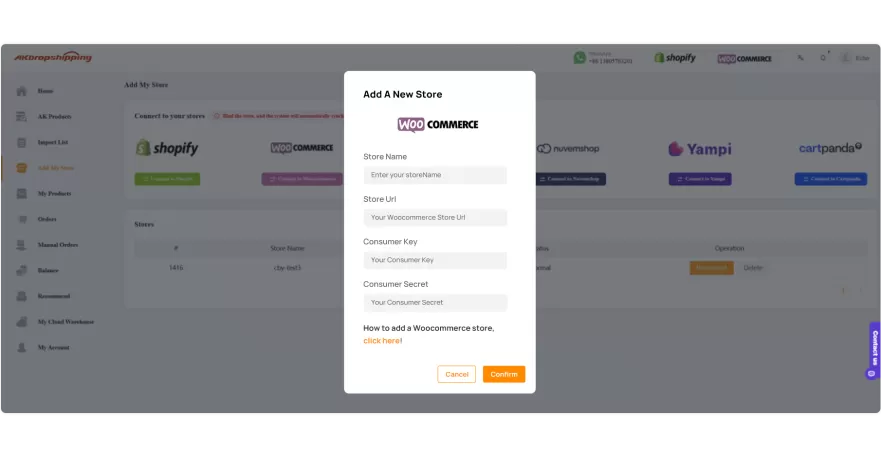
When you log into AK account, you can find Add My Store in the left sidebar. Click it and you will see all integrations here. After clicking the Connect to Woocommerce button, a panel will pop up on the page.
All the information you need to fill in is following,
Store Name: User-Defined
Store URL: Generate from WooCommerce
Consumer Key: Generate from WooCommerce
Consumer Secret: Generate from WooCommerce
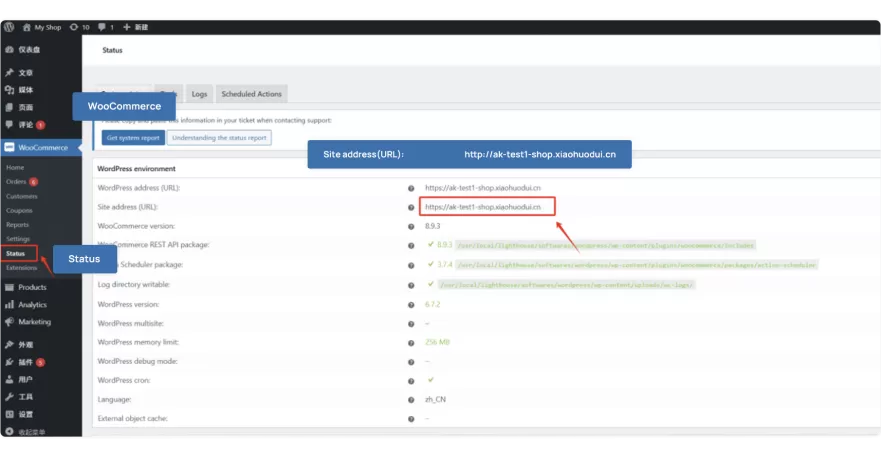
Go to WordPress page and find Status in WooCommerce dashboard and you will see the Site address (URL). Copy the URL and paste it in Store URL on AK.
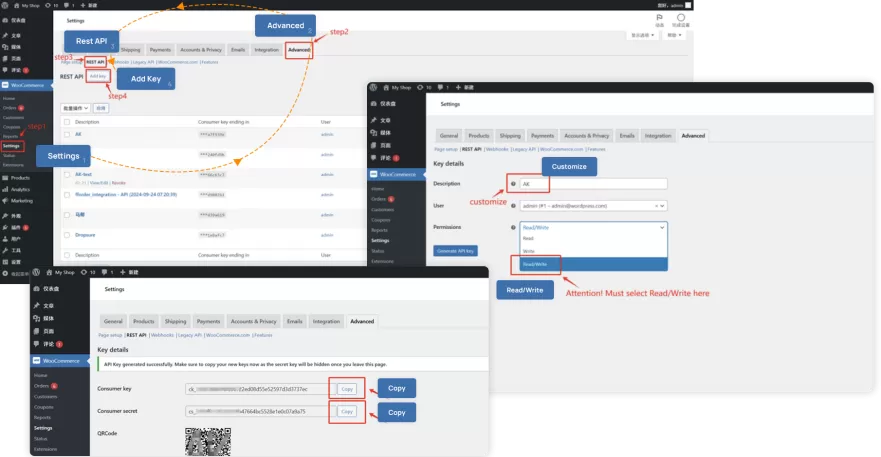
Also in the WooCommerce dashboard, you can find Settings. Click the following buttons in order, that is, Settings→Advanced→REST API→Add key.
In the Description column, you can write anything you want. And to facilitate identification and search, we recommend writing “AK Dropshipping” or just “AK”. The most important thing you need to pay attention to is that you must select Read/Write in the Permissions part. If not, the statistics of your store won’t be sync with AK Dropshipping.
After clicking the Generate API key button, you will receive the Consumer key and Consumer secret. Copy these two and paste them on AK and then click Confirm. Your store is successfully connected with AK.
Let us know if you need additional help! Enjoy your dropshipping business with AK now!

WooCommerce offers powerful open-source tools to help dropshippers create and scale successful online stores.

Latin America's all-in-one platform for building and managing online stores easily.

User-friendly Brazilian eCommerce platform offering free plans and seamless integrations for retailers.

Simple, customizable eCommerce solution to quickly launch and manage your online store.

A leading eCommerce platform for creating customizable, scalable online stores with powerful tools.
